A few months ago I was on the phone with my mom. Storms were moving
through the area, and like any mom, she was doing her mental inventory —
checking in on where all her kids were and whether any of us were in the
path of something serious. My siblings and I are scattered across the
country, and she mentioned, almost offhandedly, that she wished there was
a way she could just know when any of us were going to be affected by
severe weather. She didn't want to have to call around and piece it
together. She just wanted to be notified.
That was the spark.
My brother is a meteorologist, and weather has always been a fascination
of mine. So the idea landed on fertile ground. I decided to build
WeatherAlarm — an app that lets you register your location, and get push
notifications when severe weather is heading your way. The goal was
simple: give my mom peace of mind.
Building It With Claude Code
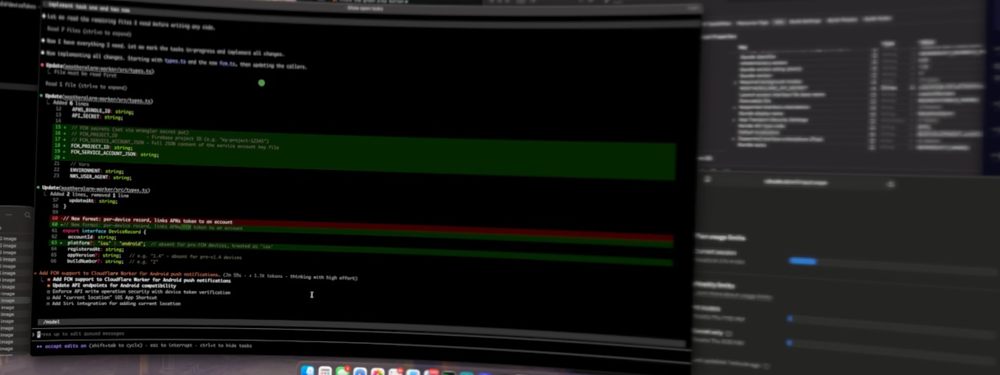
I used Claude Code to build both the iOS and Android apps, and I'll be
honest — I was skeptical about how far I'd get. I had never published
anything to the App Store before. I've always operated primarily in the
Apple ecosystem, so Android is less native territory for me. I wanted to
learn what the submission process looked like end to end, explore
Cloudflare Workers for the backend (something I'd never touched before),
and figure out push notifications, which were also new to me.
Claude Code made it approachable. I won't pretend it was zero friction —
there were plenty of moments where things didn't work as expected — but
having an AI that could help me reason through the App Store requirements,
the Cloudflare Worker configuration, and the nuances of APNs (Apple Push
Notification service) made the whole project feel tractable in a way it
might not have otherwise.
How It All Works
Before getting into what it felt like when everything clicked, it's worth
walking through how WeatherAlarm is actually put together under the hood.
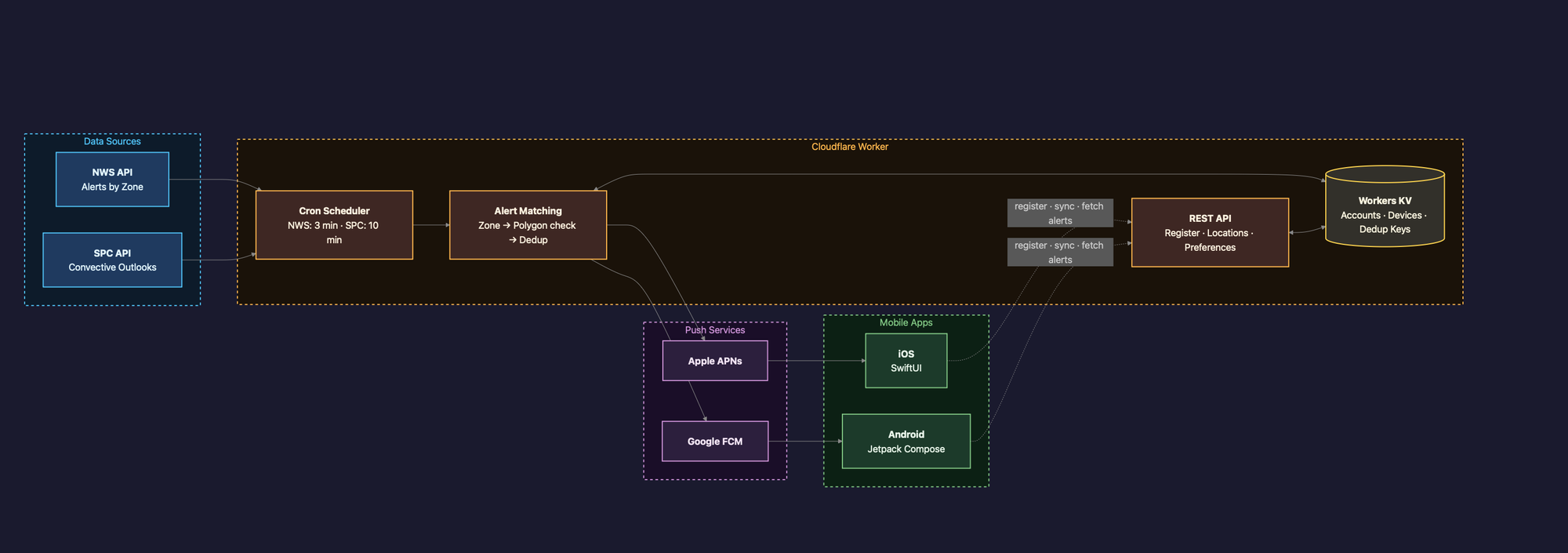
At a high level, there are four main pieces:
The Mobile Apps (iOS and Android)
When you open WeatherAlarm for the first time, the app requests permission
to send you notifications and access your location. It then registers your
device token and location with the backend. That's the extent of what the
app sends — no account, no email, no name. Just a device token and a
coordinate.
Cloudflare Workers (The Backend)
This was new territory for me. Cloudflare Workers are serverless functions
that run at the edge — meaning they execute close to wherever the request
originates, with no server for me to manage or maintain. The Worker is
responsible for storing device registrations, polling for active weather
alerts, matching those alerts against registered locations, and triggering
push notifications when there's a match. The serverless model was a
natural fit here — the Worker only needs to run on a schedule, not
continuously, and I'm not paying for idle compute.
The National Weather Service API
WeatherAlarm pulls alert data from the NWS public API, which is free and
remarkably well-structured. When a severe weather alert is issued for a
given area, the API returns the affected zones. The Worker compares those
zones against the locations registered by users and determines who should
be notified.
Push Notification Services (APNs and FCM)
Once the Worker determines that a user is in an affected area, it sends
a push notification through the appropriate service — APNs (Apple Push
Notification service) for iOS users, and FCM (Firebase Cloud Messaging)
for Android users. This was one of the more technically interesting pieces
to get right, and honestly one of the areas where Claude Code saved me the
most time. Both services have their own authentication requirements and
payload formats, and getting them both working correctly — especially
APNs, which requires specific entitlements in the iOS app — took some
iteration.
The whole system is intentionally lightweight. There's no database in the
traditional sense, no user accounts to manage, and no third-party
analytics baked in. It does one thing: watch for severe weather alerts and
let the right people know.
The First Time It Worked
There's a moment in any project like this where all the pieces finally
come together and you see it work for the first time. For me, that was
watching a push notification land on my phone from a Cloudflare Worker I
had written, triggered by a real weather alert. It was incredibly
rewarding. The kind of rewarding that makes you forget about all the
debugging sessions that led up to it.
A Lesson Learned: Background Refresh
Shortly after launch, I realized the initial version of the iOS app was
missing Background Refresh capability. That's a capability that needs to
be explicitly configured, and without it, the app couldn't properly
receive updates in the background. My initial users all had to uninstall
and reinstall the app to get the corrected version — not a great first
impression, and I felt bad about that.
What did impress me was Apple's turnaround on the fix. Once I noticed the
issue and submitted the corrected version, Apple reviewed and published it
in under an hour. The initial review process had taken almost a week. I
don't know if that's typical, but it made the fix feel a lot less painful.
Privacy First
Given my background in security, I was intentional about what the app
does and doesn't do. WeatherAlarm does not collect any personal
information, has no ads, and is designed to be as privacy-focused as
possible. Your location is used to check for weather alerts — that's it.
No accounts, no tracking, no monetization at your expense.
Try It Out
The iOS app is live on the App Store, and the Android app is currently in
beta. If you want to give it a try — or if you have a mom who worries
about where all her kids are during storm season — here are the links:
I'd love to hear any feedback. And yes, my mom has it installed.


